How to add a new/Remove gmail account to your android phone
Its the basic step we should know because now a days we have many email ids for collage ,official, fake n all....
So how to add multiple gmail in your android phone

Step 1:Go to settings of your android phone

Step 2 :Scroll down n find n click account option

Step 3 :Click account option And now u can see google n other account u have in your phone click on add Account

Step 4 : now u can see diffrent account creating option now click on google because we want to create/add Google gmail id
Now just add your email id then password u r all set process the step then finally your account is added

This way u can read your mail by switching the account
How to remove a gmail account from android phone

Step 1: Go to setting of your phone

Step 2:Scroll down N find Accounts option
Step 3:Now click the Accounts option
Step 4:Now click the google
Step 5 : Now click on the account which u want to remove

Step 6: Now click the drop box button at upper side n click on remove option
Now you have sucessfully removed account form your phone
About me
Myself Ganez ezhava i m the CEO &Founder of blogout.in i like to blog article about ease tricks ,pc tricks ,Love story ,viral news
So how to add multiple gmail in your android phone
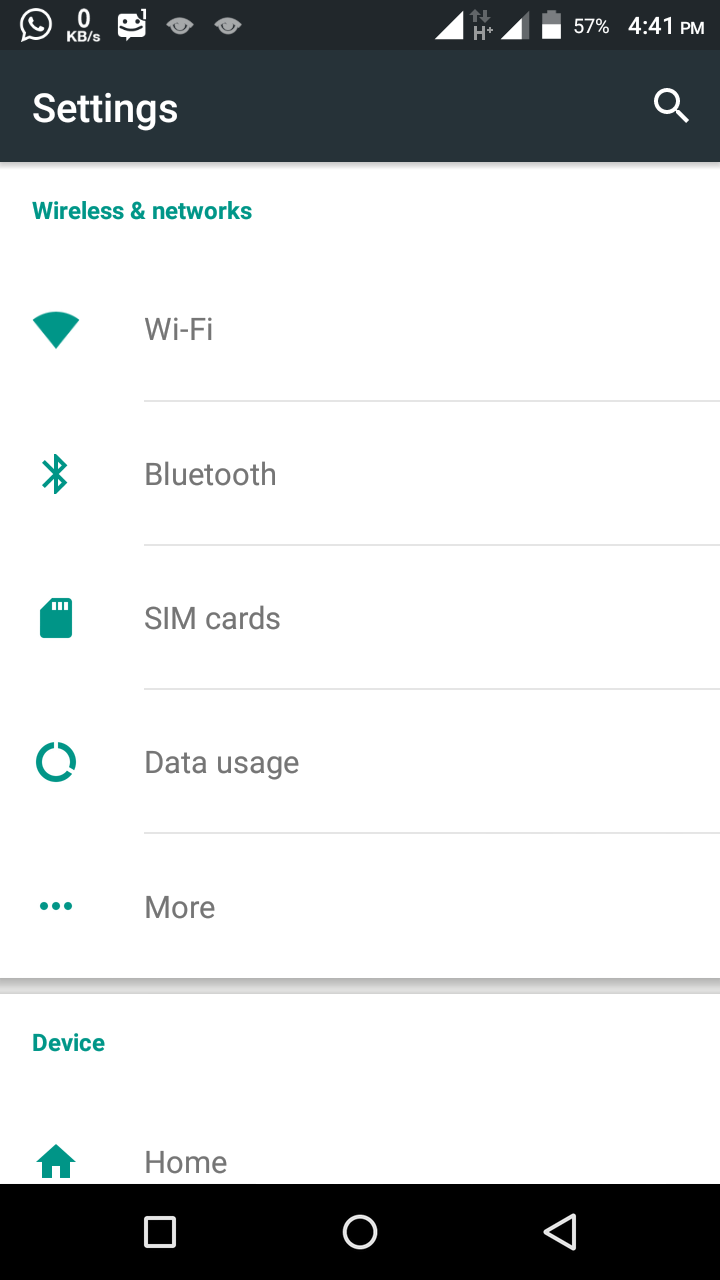
Step 1:Go to settings of your android phone

Step 2 :Scroll down n find n click account option

Step 3 :Click account option And now u can see google n other account u have in your phone click on add Account

Step 4 : now u can see diffrent account creating option now click on google because we want to create/add Google gmail id
Now just add your email id then password u r all set process the step then finally your account is added

This way u can read your mail by switching the account
How to remove a gmail account from android phone

Step 1: Go to setting of your phone

Step 2:Scroll down N find Accounts option
Step 3:Now click the Accounts option
Step 4:Now click the google
Step 5 : Now click on the account which u want to remove

Step 6: Now click the drop box button at upper side n click on remove option
Now you have sucessfully removed account form your phone
About me
Myself Ganez ezhava i m the CEO &Founder of blogout.in i like to blog article about ease tricks ,pc tricks ,Love story ,viral news


Hii Thanks for a tip mary its was a gud tip by you
ReplyDelete